 (Edit)
button besides it,
(Edit)
button besides it,Open the Call Assign screen.
Generate & Assign Call
>>Want to Add or Modify Generate & Assign Call Information?
Suppose you want to Add or Modify the Assign Call of Reliance Customer.
1- First Select the Generate & Assign Call.
2- In the grid below, you will find the Reliance Customer. Just click on
the (Edit)
button besides it,
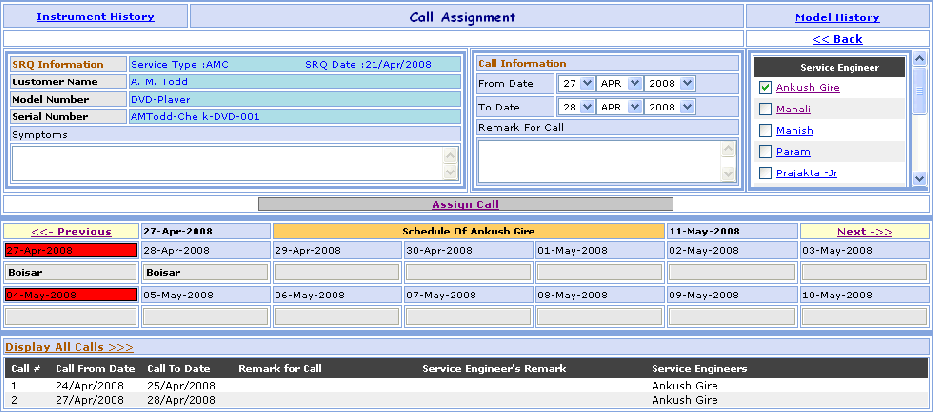
Open the Call Assign screen.
>> Assign Call Information:
1- Select Assign Call Date (From Date & To Date).
2-
Select  Service
Engineer.
Service
Engineer.
3- Enter the Remark For Call.
4- Click on Assign Call button, to Assign the Call Reliance Customer.
5- Click on << Back link, go to the Call Management Search screen.
>>Want to see the Service Engineer Call Information?
Suppose you Want to see the Call Information of Manish Service Engineer.
2- See the Schedule of Manish Service Engineer below the Assign Call button.
3- Do you want See the Previous Call Click on <<- Previous button.
4- Do you want See the Next Call Click on Next ->> button.
>>Want to see the Call of Particular Service Engineer?
Suppose you want to see the All Call of Manish Service Engineer.
1- Assign the Call of Manish Service Engineer.
2- Click on Display All Calls >>> link, to display the all Calls of Manish Service Engineer.
>>Want to see Instrument History?
Suppose you Want to see the Instrument History of Reliance Customer.
1- Click on the Instrument History link that is seen at the left corner of the page, open the Instrument History screen.
>>Want to see Model History?
1- Click on the Model History link that is seen at the right corner of the page, open the Model History screen.
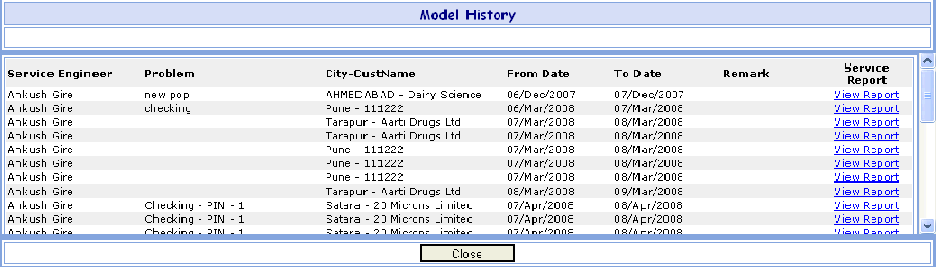
>>Want to see Service Report?
Suppose you Want to see the Service Report of Manish Service Engineer.
1- In the grid below, you will find the Manish Service Engineer. Just click on
the View Report link besides it,
Open the Service Report screen.